AI Web Design & Motion Design Skill System
How we route web design, motion design and vibe coding requests to focused AI skills
Design direction, UI engineering gates, motion runtime policy, browser QA and routing evals
A practical skill-family architecture for higher-quality AI-assisted frontend development
Codex skills, AI web design, motion design and production frontend QA
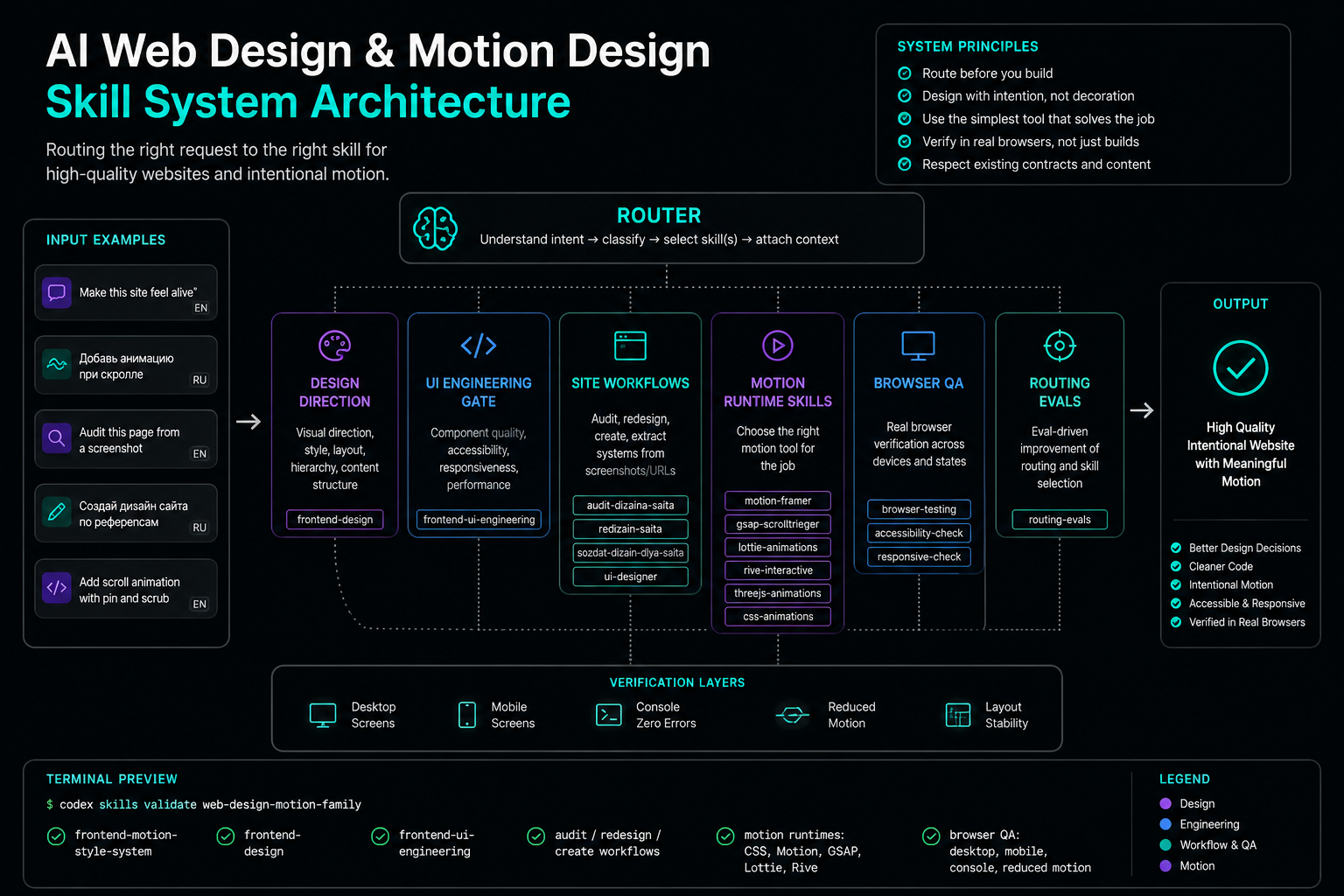
$ codex skills validate web-design-motion-family
✓ frontend-motion-style-system
✓ frontend-design
✓ frontend-ui-engineering
✓ audit / redesign / create workflows
✓ motion runtimes: CSS, Motion, GSAP, Lottie, Rive
✓ browser QA: desktop, mobile, console, reduced motionIntroduction
AI can build websites. It can generate a landing page, a React dashboard, a component, a form, a hero section, a scroll reveal, or an entire frontend artifact in minutes. But there is a large gap between "AI wrote code" and "AI designed a good website."
The problem is not that the model does not know CSS, React, GSAP, Lottie, or Rive. The deeper problem is decision routing. Without a system, an AI coding agent often chooses the wrong level of solution.
It may install GSAP for a simple fade-in. It may turn a dashboard into a marketing landing page. It may invent fake customer logos. It may add generic gradients, identical card grids, hover-scale spam, and decorative motion that has no job. It may use stale animation APIs or copy outdated snippets. It may pass a build while the UI is visually broken on mobile.
This is the core failure mode of AI-generated frontend work: not lack of syntax knowledge, but lack of operational taste.
To fix this, we did not create one giant prompt. We built a full skill family for AI web design, motion design, and frontend engineering.
The Real Problem: Routing, Not Knowledge
When a user says:
> "Make this site better"
or:
> "Add animation"
or:
> "Make the landing page feel alive"
the AI agent must first understand what kind of work is being requested:
- existing site audit;
- full redesign;
- greenfield site creation;
- focused UI polish;
- motion design;
- scroll storytelling;
- design-system extraction;
- browser QA;
- accessibility and responsive fixes;
- preservation of existing production contracts.
Without routing, all of these collapse into one vague action: "change the frontend until it looks more exciting."
That is how AI-slop happens.
Why a Skill Family Beats a Mega-Skill
A single massive frontend skill becomes hard to trigger, hard to maintain, and easy to contradict. It mixes visual design, React architecture, CSS, animation, scroll effects, Lottie, Rive, accessibility, browser testing, Figma, screenshots, SEO, and build tooling.
Instead, we split the system into focused skills:
web-design-motion-skill-family/
├── frontend-motion-style-system     # routing for visual/motion/media/3D ambiguity
├── frontend-design                  # visual direction and anti-slop design quality
├── frontend-ui-engineering          # implementation quality and accessibility gates
├── audit-dizaina-saita              # existing site audit
├── redizain-saita                   # full redesign
├── sozdat-dizain-dlya-saita         # greenfield site creation
├── ui-designer                      # extraction from screenshots/URLs/code/tokens
├── motion-framer                    # Motion for React
├── gsap-scrolltrigger               # advanced scroll choreography
├── lottie-animations                # dotLottie/Lottie assets
├── rive-interactive                 # Rive state machines
├── lightweight-3d-effects           # legacy/niche decorative depth
├── browser-qa-localhost             # localhost verification
├── browser-qa-console-logs          # console/runtime QA
└── frontend-skill-update            # maintenance skill
Each skill has a job. The system works because responsibilities are separated.
The Router: frontend-motion-style-system
The central routing skill handles prompts with visual or motion ambiguity:
- "make the site feel alive";
- "add animation";
- "add scroll animation";
- "make the hero more memorable";
- "add motion";
- "add 3D";
- "add Lottie";
- "add Rive";
- "make it more interactive";
- "make it visually interesting."
But it must not hijack ordinary frontend tasks. If the user says:
> "Make this form cleaner"
or:
> "Polish this dashboard table"
that should route to frontend UI engineering, not motion design.
The router became the decision layer for choosing between CSS, Motion, GSAP, Lottie, Rive, and 3D.
Motion Runtime Policy
The core rule:
> Use the simplest motion system that solves the product problem.
Simple hover/focus/state feedback     -> CSS
React layout/gesture/exit animation   -> Motion
Pinned/scrubbed scroll storytelling   -> GSAP ScrollTrigger
Designer-exported vector asset        -> dotLottie / Lottie
Interactive state-machine asset       -> Rive
Real 3D scene                         -> Three.js / React Three Fiber
Small decorative depth                -> CSS or lightweight legacy/niche only
This avoids a common AI failure: adding a heavy runtime when a small CSS transition would be better.
Frontend Design: Visual Direction, Not Decoration
The frontend-design skill exists to make the AI ask better questions before touching visuals:
- What type of page is this?
- Who is the audience?
- What is the primary user task?
- Is this a landing page, product UI, dashboard, portfolio, editorial page, tool, or game?
- What brand register fits the product?
- What real assets and constraints exist?
- What claims are sourced, and what must remain placeholder?
Good design is contextual. A SaaS dashboard and a fashion portfolio should not share the same visual logic.
Anti-Slop Design Gates
The system explicitly flags:
- generic purple/blue gradients;
- repeated equal-weight card grids;
- invented metrics;
- fake testimonials;
- fake customer logos;
- vague CTAs;
- hover-scale everywhere;
- pulse loops;
- tiny uppercase eyebrows in every section;
- stock-like visuals that do not reveal the product;
- weak contrast;
- clipped headings;
- mobile layouts where the primary action disappears.
The point is not sterile minimalism. The point is intentional design.
Frontend UI Engineering: The Production Gate
The frontend-ui-engineering skill is the practical implementation gate.
It checks:
- semantic HTML;
- visible focus;
- keyboard paths;
- form labels and errors;
aria-describedby;- preserving user input after validation errors;
- disabled/loading states;
- 320 CSS px;
- 400% zoom/reflow;
- touch targets;
- layout stability;
- CLS risks;
- media dimensions and aspect ratios;
- avoiding
transition: all; - console errors;
- browser verification.
This layer prevents a design from becoming a fragile screenshot.
Site Workflows: Audit, Redesign, Create
We split site work into three workflows:
- Audit: the site exists, and the task is to identify and improve weak points.
- Redesign: the site exists, but the visual language needs to be rethought.
- Create: the site does not exist, or the user wants a new design from scratch.
This prevents the AI from doing a full redesign when the user only asked for an audit.
Multilingual Triggers Matter
Because users often write naturally, the system supports Russian trigger phrases:
- "сделай сайт";
- "нужен сайт";
- "сверстай лендинг";
- "переделай сайт";
- "посмотри дизайн";
- "что не так с сайтом";
- "оживи сайт";
- "добавь анимацию";
- "скролл-анимация".
This is important for real AI agent workflows. Users do not always name the skill. They describe intent.
Preservation Rules
When editing an existing project, the AI should preserve:
- routes and slugs;
- navigation labels;
- form fields;
- analytics hooks;
- test selectors;
- legal and cookie copy;
- canonical/meta structure;
- heading baseline;
- SEO-critical structure;
- existing accessibility wins.
Fast AI edits are risky because they can break things that are not visually obvious.
Motion Design: Fewer Effects, Better Moments
Bad AI motion looks like this:
- every section fades in the same way;
- every card scales on hover;
- buttons pulse for no reason;
- scroll effects do not match the story;
- first-screen content is hidden until animation completes;
- there is no reduced-motion fallback;
- mobile layout jumps;
- GSAP is used for trivial reveals.
Good motion starts with a motion budget.
Motion Budget
Before adding animation, the AI should define:
- the purpose of the motion;
- the user benefit;
- how often it appears;
- whether it supports orientation, hierarchy, feedback, continuity, brand expression, or delight;
- the reduced-motion behavior;
- performance risks;
- mobile behavior;
- layout stability risks.
Runtime Examples
For simple UI feedback, Motion or CSS is enough:
import { motion, useReducedMotion } from "motion/react";

export function SaveButton({ busy }: { busy: boolean }) {
  const reduce = useReducedMotion();

  return (
    <motion.button
      whileTap={reduce ? undefined : { scale: 0.97 }}
      animate={{ opacity: busy ? 0.72 : 1 }}
      transition={{ duration: reduce ? 0 : 0.18, ease: "easeOut" }}
      disabled={busy}
    >
      {busy ? "Saving" : "Save changes"}
    </motion.button>
  );
}
For advanced scroll choreography, GSAP ScrollTrigger is appropriate:
gsap.registerPlugin(ScrollTrigger);

const mm = gsap.matchMedia();

mm.add("(min-width: 900px)", () => {
  const tl = gsap.timeline({
    scrollTrigger: {
      trigger: ".story",
      start: "top top",
      end: "+=1800",
      scrub: true,
      pin: true,
      invalidateOnRefresh: true
    }
  });

  tl.to(".flow-node", { opacity: 1, stagger: 0.2 })
    .to(".flow-line", { scaleX: 1, transformOrigin: "left" });
});
Lottie and Rive
The system treats Lottie and Rive as bounded asset runtimes, not general-purpose website animation tools.
For Lottie:
- prefer
.lottiefor new web work; - use
@lottiefiles/dotlottie-react; - use
@lottiefiles/dotlottie-webfor direct canvas control; - use workers only when they are justified;
- keep
lottie-webas a legacy Bodymovin JSON path.
For Rive:
- prefer
@rive-app/react-webgl2; - use Rive for state-machine-driven animation;
- keep semantic controls in HTML;
- verify canvas sizing and nonblank rendering;
- provide fallback behavior where motion is essential.
Browser QA
Build success is not enough for frontend work.
The system requires browser verification:
- desktop;
- mobile;
- console errors;
- broken assets;
- horizontal overflow;
- reduced motion;
- layout shift;
- nonblank canvas/WebGL;
- form states;
- keyboard paths where relevant.
AI-generated UI often compiles while still being visually broken. Browser QA catches that.
Reference Hygiene
References are useful only when they are curated and linked.
We kept:
- routing matrices;
- UI quality gates;
- design-system output templates;
- current Motion notes;
- dotLottie runtime notes;
- Rive runtime notes;
- GSAP lifecycle notes.
We removed:
- huge unreferenced dumps;
- stale generated code;
- fake starter templates;
- old CDN-heavy 3D examples;
- broken scripts;
- schema-unaware optimizers;
- deprecated package snippets.
A reference file should help the agent make a better decision. Otherwise it is noise.
Routing Evals
The system includes routing evals:
{
  "prompt": "Make this site feel alive, but keep it restrained",
  "expect": [
    "frontend-motion-style-system",
    "frontend-design",
    "frontend-ui-engineering"
  ]
}{
"prompt": "Polish this form without animation",
"expect": ["frontend-ui-engineering"],
"expect_not": [
"frontend-motion-style-system",
"motion-framer",
"gsap-scrolltrigger"
]
}{
"prompt": "Add scroll animation with pin and scrub",
"expect": [
"frontend-motion-style-system",
"gsap-scrolltrigger"
]
}Routing evals protect the system from drifting into over-triggering or under-triggering.
Why This Matters for Vibe Coding
Vibe coding works best when the AI can move quickly without becoming careless.
A good AI coding agent should:
- move fast;
- preserve production contracts;
- experiment visually;
- verify in the browser;
- avoid fake proof;
- add motion only when it helps;
- avoid unnecessary dependencies;
- respect accessibility and responsive layout;
- choose the right runtime.
The skill family gives the agent operational taste.
System Diagram
flowchart TD
    A["User prompt"] --> B{"Intent?"}
    B -->|Existing site critique| C["audit site design"]
    B -->|Full redesign| D["redesign site"]
    B -->|New site| E["create site design"]
    B -->|Visual direction| F["frontend-design"]
    B -->|Implementation QA| G["frontend-ui-engineering"]
    B -->|Motion/media ambiguity| H["frontend-motion-style-system"]
    H --> I{"Runtime choice"}
    I -->|Simple UI| J["CSS"]
    I -->|React layout/gesture/exit| K["Motion"]
    I -->|Pin/scrub/timeline| L["GSAP ScrollTrigger"]
    I -->|Designer vector asset| M["dotLottie"]
    I -->|State-machine animation| N["Rive"]
    I -->|Real 3D| O["Three.js/R3F"]
    C --> P["Browser QA"]
    D --> P
    E --> P
    F --> P
    G --> P
    H --> P
Practical Prompt
Run a full audit and improvement pass on the local website.

Open the site in a browser and check desktop and mobile. First evaluate the visual
system: composition, first viewport, typography, spacing, CTA, grid, responsive
behavior, contrast, forms, states, consistency, and AI/generic feel.

Then propose and implement improvements in code. Do not break routes/slugs, forms,
SEO/meta, analytics/test selectors, legal/cookie copy, or accessibility patterns.
If the surface is a dashboard/tool/product UI, do not turn it into a landing page.

Use frontend-motion-style-system for a motion audit. Propose 2-4 meaningful motion
moments and choose the correct runtime: CSS, Motion, GSAP ScrollTrigger, Lottie, or Rive.

Do not add parallax, smooth scroll, 3D, Lottie, or Rive by default.
Provide reduced-motion fallback.

After changes, verify desktop/mobile, console errors, horizontal overflow,
layout shift, and reduced motion. In the final response, summarize what changed
and how it was verified.
Conclusion
A strong AI frontend workflow is not one magic prompt. It is a routing system, a set of quality gates, a motion policy, verification habits, and focused skills with clear responsibilities.
The result is not a single skill. It is a web design and motion skill family.
It helps an AI coding agent:
- understand English and Russian user intent;
- distinguish audit from redesign;
- avoid turning dashboards into landing pages;
- avoid GSAP when CSS is enough;
- avoid fake metrics and generic AI layouts;
- use Motion, Lottie, Rive, and 3D only when justified;
- verify the result in a browser;
- preserve production contracts;
- make websites feel alive without making them chaotic.
This is the next step in AI-assisted frontend development: not just AI that writes code, but AI that works inside a design and engineering system.
Where This Applies
Teams using AI agents to build real frontend products
This workflow is useful when AI-assisted product development needs more than quick UI generation: design judgment, controlled motion, accessibility, responsive QA and production constraints.
- Teams using Codex, Claude Code or similar AI coding agents for websites and product UI.
- Projects where vibe coding needs review, testing, browser checks and deployment discipline.
- Businesses that need AI web design or AI automation interfaces without generic AI-slop visuals.