AmoBit Inbox
Browser-first B2B inbox for multi-channel operator workflows
React workspace client, Django backend and protected media runtime
Messaging architecture article for AI-coded internal tools
Browser-first B2B inbox architecture
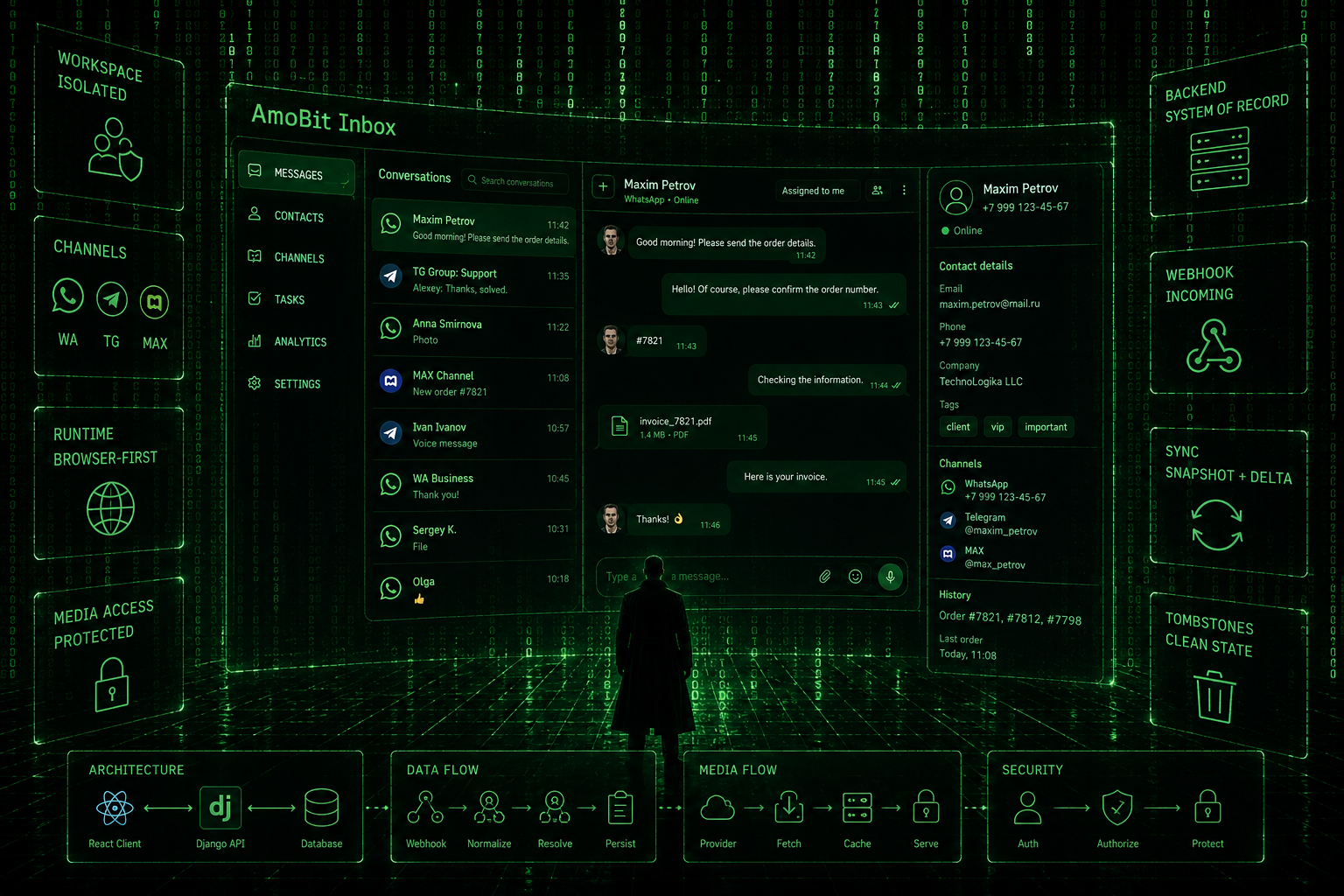
Overview
Multi-channel inbox product summary
AmoBit Inbox is a web-first B2B inbox for handling customer conversations from multiple messaging channels in one workspace.
The product is not a CRM clone and not a desktop messenger wrapper. Its core idea is simpler: operators log in through the browser, open their workspace, connect channels, process dialogs, view contact context, send messages and media, and keep follow-up work close to the conversation.
The product is built around a React client and a standalone Django backend. The backend is the system of record for workspaces, users, channels, contacts, threads, messages, attachments, profile data and protected media access.
Product Model
Workspace, channel and provider model
AmoBit Inbox is organized around workspaces.
A workspace represents a separate company or customer cabinet. Users belong to workspaces through memberships, and each workspace has its own connected channels, dialogs, contacts and operational state.
The channel model separates provider account credentials from concrete routing identities. For shared aggregator channels such as WA, TG and MAX, the external API token is account-level, while profile_id identifies the actual channel profile used for routing. Direct bot channels such as TG BOT and MAX BOT are treated separately.
This distinction matters because one provider account can serve several channel profiles. The product should not assume that every visible WhatsApp, Telegram or MAX channel has a unique external API token.
Main Workspace
Operator interface structure
The main operator screen is Сообщения.
It combines:
- a queue of dialogs
- the active conversation
- message history
- text, file and voice sending
- media rendering
- channel indicators
- group chat metadata
- reactions
- contact and context surfaces
The interface is designed as a working tool rather than a marketing page. Earlier UI work focused heavily on density, stable scrolling, compact navigation, readable chat cards and keeping the composer available during normal work.
For mobile and narrow screens, the chat flow follows a list-to-thread-to-details model instead of trying to compress the full desktop split layout into one screen.
Contacts
Contact context and conversation surface
Contacts are a separate product surface, not just a side effect of messages.
The Contacts section includes a list/grid style interface and a right-side contact card. The card can show contact properties, channel rows and an embedded conversation window. The contact conversation can hydrate real messages, fall back to timeline messages, send text, files and voice, and load older history without disruptive scroll jumps.
The product also includes duplicate/linking flows. The merge flow allows choosing primary values while preserving multiple phones, multiple emails, channels and tags. In the current materials, the merge modal UI exists, while persistence to a backend merge endpoint is left as a follow-up.
Messaging Runtime
Webhook, persistence and outbound flow
The backend handles incoming webhooks, message normalization, thread resolution, contact resolution, message persistence, attachments, delivery status and outbound sending.
The runtime supports text, media and voice paths. For media, the backend exposes protected media access and signed share URLs where provider delivery needs a reachable file URL. Browser UI media access remains authenticated rather than public-by-default.
The product also handles reactions as message events. Reactions are rendered as attached pills on target messages when the target can be resolved, with fallback behavior for unresolved events.
Group Chats
Group metadata and participant handling
Group chats are modeled explicitly.
A group is not treated as a direct dialog with a changing participant name. The backend tracks whether a thread is a group, prefers real group metadata for titles, and avoids using the latest sender as the group title or avatar.
This required provider payload hardening. Boolean-like provider fields such asisGroup="false" are parsed explicitly instead of relying on generic truthiness. Group avatars are accepted only from chat-level avatar fields, not from fields that may actually contain the latest participant avatar.
In the UI, group conversations can show sender names inside incoming bubbles and use group-specific labels or icons instead of direct-contact assumptions.
Media Handling
Protected media access and caching
Media is deliberately conservative.
AmoBit Inbox does not treat protected media as public static files. Media access goes through backend-controlled endpoints, and remote provider media can be stored metadata-first.
For MAX media, the program uses lazy caching: the provider file is fetched and cached only when the operator opens it. Cache TTL, maximum object size and cleanup tooling limit storage growth. This avoids eagerly downloading every protected file just because a chat appeared in the browser.
A real provider issue was also handled: some MAX payloads contained a small placeholder body while the actual file URL was available elsewhere in the payload. The backend was changed to prefer safe provider file URLs for MAX media, and a repair command was added for previously stored bad attachments.
Browser Runtime
Web-first deployment model
AmoBit Inbox is now web-first.
The canonical runtime is the browser deployment, with login and authenticated workspace routes. Desktop/Tauri packaging exists in the repository but is legacy unless desktop work is explicitly reopened.
The browser runtime uses the backend as the source of truth. On first workspace load, the client forces a full server snapshot so reloads, restored tabs and old browser cache do not leave the queue in a misleading state. Delta sync is used for ongoing updates, but not as the only source of truth.
Deleted or cleaned-up threads are reconciled through backend tombstones. The changes endpoint can return deleted thread information, and the browser removes tombstoned conversations, messages, cursors and stale active selections from local state.
Operational Hardening
Security, sync and failure boundaries
The platform includes several hardening decisions that are part of the product shape, not just implementation cleanup.
Dev bootstrap is not the production auth model. The product uses explicit login/logout and authenticated sessions. Webhook handling requires valid channel authorization instead of trusting spoofable request metadata.
The backend avoids returning raw connector secrets to normal clients. Channel management distinguishes configured state from secret values, and operator-facing UI should not expose provider secrets unnecessarily.
Production cleanup is expected to be backup-first and repeatable. Manual database surgery is treated as too risky for recurring import or messaging problems. Existing tooling includes dry-run-first repair or cleanup commands for specific cases, and the active remaining question is whether broader invalid-import cleanup needs its own command.
Deployment Shape
Same-origin deployment and proxying
The live web runtime is served through nginx from the backend server.
The frontend bundle is served from the root web path, while /api/ is proxied to Django. This same-origin shape keeps browser behavior simpler and avoids unnecessary CORS complexity in the current deployment model.
The project materials identify https://inbox.amobit.io as the canonical review/runtime URL. Legacy sandbox routes are no longer treated as working review zones.
Current Status
Active runtime scope
AmoBit Inbox is a browser-first inbox application with:
- workspace login
- isolated workspace data
- channel provisioning
- WhatsApp and MAX QR-oriented authorization flows
- message queue and thread view
- text, file, image and voice handling
- protected media delivery
- group chat support
- reactions
- contacts and merge UI
- profile and channel surfaces
- reminders as part of the operator workspace
The main remaining hardening topic in the available project plan is cleanup-tooling acceptance for future bad imports. The broader product direction is already settled: AmoBit Inbox is an independent web inbox, with the backend as system of record and the browser client as the primary operator surface.
Where This Applies
Messaging operations, protected media and AI-assisted support workflows
This case is relevant when customer conversations are operational work, not just messages in a channel.
- Support, sales or operations teams that need one controlled inbox across messaging channels.
- Products where media access, workspace boundaries and backend source of truth matter.
- Teams preparing for AI-assisted routing, drafts, summaries or operator copilots.
receive provider webhook
normalize message payload
resolve workspace / thread / contact
persist messages and attachments
sync browser runtime from backend snapshot
apply delta updates and tombstones