AR Nail Try-On MVP with React, Vite, MediaPipe and Canvas2D
Browser-based virtual manicure try-on MVP for beauty salons and interactive product websites
Live camera UX, MediaPipe hand tracking, Canvas2D overlays and PNG nail assets
Computer vision proof of work from an AI developer and AI coding studio in Armenia
AR try-on, beauty tech AI, browser computer vision and AI-assisted product development
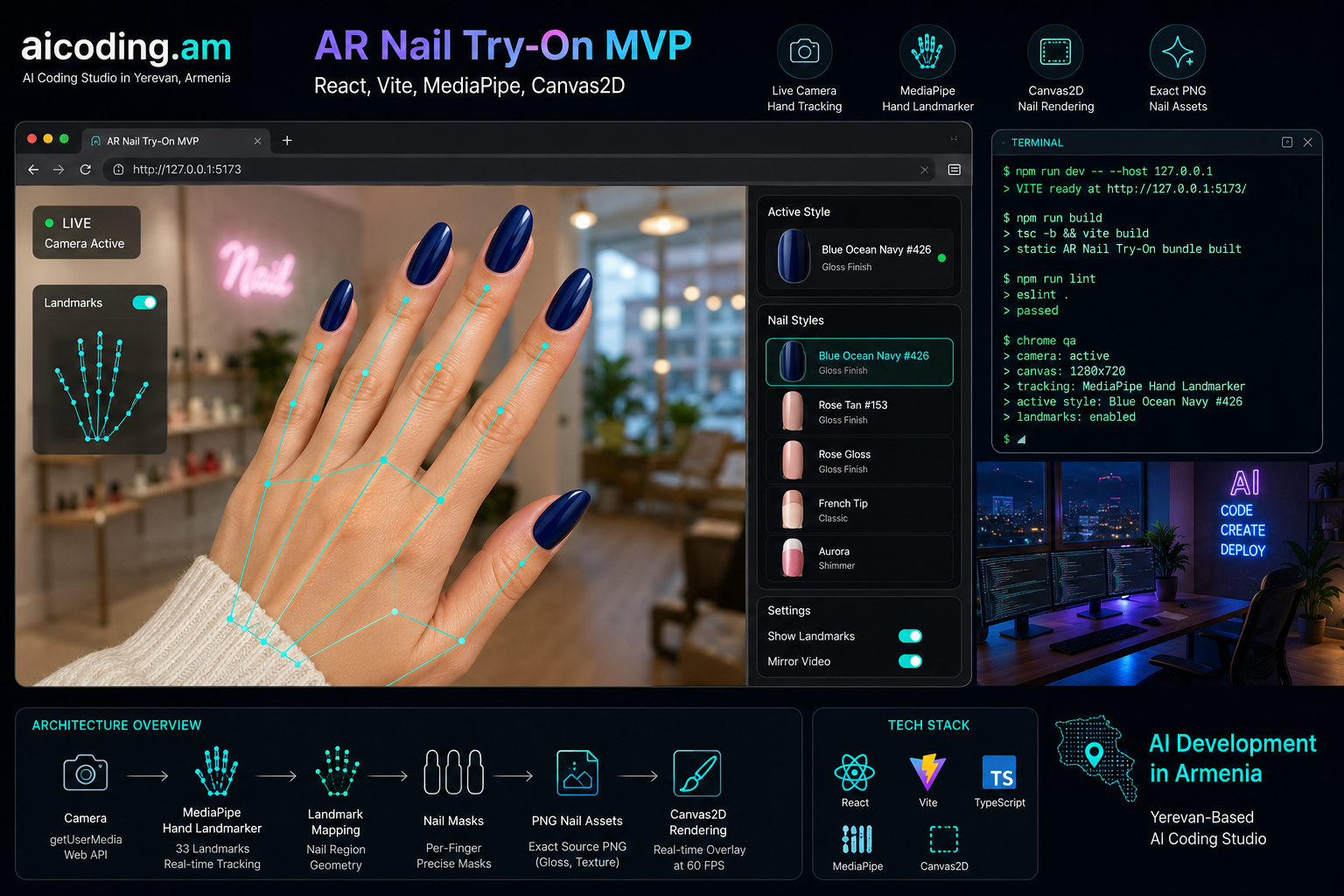
$ npm run dev -- --host 127.0.0.1
> VITE ready at http://127.0.0.1:5173/
> camera: active
> canvas: 1280x720
> tracking: MediaPipe Hand Landmarker
> active style: Blue Ocean Navy #426This article is a detailed engineering write-up of a browser-based AR Nail Try-On MVP. The project started from a product idea for a manicure salon: a user opens a website, enables the camera, shows a hand, and the page previews different nail designs directly on the user's fingers.
For a client, this feels like a simple interactive feature. For engineering, it touches live camera UX, browser permissions, MediaPipe hand tracking, computer vision geometry, Canvas2D rendering, PNG asset fitting, privacy constraints, frontend state, mobile compatibility and search-friendly product storytelling.
That is why this is a useful case study for aicoding.am, AI Armenia, AI developer Armenia, AI developer Yerevan, AI coding studio Yerevan and custom AI product development. It is not a generic AI chatbot demo. It is a practical computer vision MVP that turns an idea from the beauty industry into a working browser experience.
The current prototype is not a finished commercial AR platform, and it should not be described as one. It is a real MVP: local camera, one-hand tracking, landmark-derived nail masks, exact PNG nail product rendering, optional calibration, debug landmarks, static hosting assumptions and Chrome verification.
The product idea
The original user-facing goal was direct:
- a person opens the website of a manicure salon;
- the camera turns on after a user action;
- the system detects the hand, fingers and fingertips;
- artificial nails or nail polish designs are inserted over the real fingers;
- product PNG nails should be used as the source visual;
- when the palm faces the camera, nail overlays should not sit unnaturally on top of the fingers;
- the result should be an MVP component that can later be embedded into a website.
This is the kind of task where AI-assisted product development and vibe coding can move fast, but only if the implementation is grounded in real constraints. We did not start by training a custom nail segmentation model. Instead, we chose a practical first version:
- MediaPipe Hand Landmarker for hand tracking;
- React and Vite for the frontend app;
- TypeScript for safer iteration;
- Canvas2D for the overlay;
- static self-hosted model and WASM assets;
- no backend for camera frames;
- exact PNG product assets clipped into generated nail masks.
This approach makes the MVP useful quickly while leaving room for stronger segmentation, depth and mobile tuning later.
Why this matters for AI Armenia, Yerevan and local businesses
Many companies hear "AI" and think only about LLM chatbots, automation workflows or RAG systems. Those are important, but practical AI development is broader. A beauty salon, retail brand, clinic, real estate company or e-commerce team often needs an interactive product experience, not only a conversational assistant.
AR nail try-on is a strong example:
- it gives users a clear visual outcome;
- it helps a manicure salon differentiate its website;
- it can support product selection before booking;
- it creates shareable, interactive website behavior;
- it connects AI, computer vision and frontend product design.
For search queries such as AI developer Armenia, AI developer Yerevan, AI coding Armenia, computer vision developer Armenia, AR try-on app development and AI product development for beauty salons, this case provides practical proof. It shows how an AI developer can go from product uncertainty to a functioning MVP with browser runtime discipline.
Current architecture
Technically, the MVP is structured as a Vite React TypeScript application: a normal frontend page that can be run locally, built as a static bundle and later embedded into a salon website or product landing page.
Main files:
src/App.tsx- demo shell, nail style registry and default active style;src/ar/NailTryOnWidget.tsx- camera lifecycle, render loop, controls, calibration UI and debug landmarks;src/ar/handTracker.ts- MediaPipe Hand Landmarker loading and inference wrapper;src/ar/nailGeometry.ts- landmark-to-nail geometry, nail mask generation, palm-facing logic;src/ar/nailRenderer.ts- Canvas2D rendering for colors, textures, PNG assets, occlusion and landmarks;src/ar/calibration.ts- default per-finger fit and localStorage persistence;src/ar/types.ts- shared TypeScript types;public/models/hand_landmarker.task- self-hosted MediaPipe model;public/wasm/- self-hosted MediaPipe WASM runtime;public/nails/- transparent PNG nail assets.
The app has no backend in the MVP. It can be built as a static bundle and hosted over HTTPS. Camera access requires HTTPS outside localhost.
Camera and browser flow
The camera starts only after a user click. This is required for browser permission rules and is especially important on mobile. The app requests video with a high-quality preset first and then falls back to smaller resolutions if needed.
The active stream is assigned to a <video> element. A <canvas> sits over the video and draws the nail overlays. When the camera is active in Chrome, the canvas has been verified at 1280x720.
The widget handles:
- camera start;
- camera stop;
- MediaPipe tracker creation;
- MediaPipe tracker cleanup;
stream.getTracks().forEach(track => track.stop());- render loop scheduling;
- lost tracking state;
- debug landmarks;
- style selection;
- edit mode and reset fit.
This matters because a website component must not leave the camera running after it is stopped or unmounted.
MediaPipe Hand Landmarker
The MVP uses @mediapipe/tasks-vision and the Hand Landmarker model. MediaPipe returns 21 hand landmarks. It does not directly return nail boundaries.
That means the nail geometry must be inferred from finger landmarks:
- TIP gives the fingertip;
- DIP gives the distal joint;
- PIP and MCP help estimate finger size;
- the vector from DIP to TIP gives orientation;
- a perpendicular vector gives nail width direction.
This is why the MVP is described as landmark-derived nail masks, not nail segmentation. It is a correct technical distinction and should be preserved in any SEO article, case study or sales page.
Parametric nail geometry
Early versions of the nail shape looked too rough and triangular. The geometry was then improved with a more feminine parametric nail model. Instead of one generic shape for all fingers, the system stores per-finger model values:
- length;
- base width;
- middle width;
- tip width;
- curvature radii;
- cuticle depth;
- tip roundness;
- visible extension.
The current Canvas2D implementation uses the 2D part of that model: variable width along the nail, U-shaped cuticle, rounded tip and per-finger proportions. The thumb is wider, the little finger is smaller, and the index/middle/ring fingers are visually more elongated.
The model is not a medical measurement system. It is an engineering approximation for a live camera MVP. Its job is to look plausible and to give a stable base for calibration.
Nail placement and TIP anchoring
One of the most important tuning rounds was the relationship between MediaPipe's fingertip point and the artificial nail image.
If the PNG nail starts too high, it floats above the fingertip. If it starts too low, it becomes a sticker on the finger. The current implementation uses an anchor drop ratio: the nail base is placed below the tracked TIP by 25% of the nail height.
This is an MVP heuristic. It is not universal for every hand and camera angle. It works together with optional calibration, visible landmarks and live Chrome testing.
Exact PNG rendering
A major product requirement was exact PNG insertion. The user did not want a recolored approximation. The PNG should be inserted as the product visual.
Two product assets were added:
Rose Tan #153;Blue Ocean Navy #426.
The processing was technical only:
- remove the white background;
- keep internal highlights;
- keep the original color and visual texture;
- crop transparent padding;
- save as transparent PNG;
- render it into the nail mask.
For PNG styles, the renderer avoids synthetic effects. It does not add the artificial highlight and contour used for generated color modes. This is important for beauty products because polish images, catalog nails and salon references often already include highlights, shadows and material information.
The NailStyle type now supports:
pngFit?: 'contain' | 'cover'For exact product previews, pngFit: 'contain' is used. This preserves the source image proportions and prevents unnecessary cropping.
Why Canvas2D was the right MVP choice
The first MVP does not use Three.js or WebGL. That was intentional.
Canvas2D is enough for:
- video overlay;
- hand landmarks;
- generated paths;
- clipping PNG images into masks;
- drawing color and texture previews;
- simple occlusion;
- fast iteration in Chrome.
WebGL or Three.js could become useful later for:
- real 3D nail curvature;
- physically based polish highlights;
- better depth handling;
- side-view rendering;
- segmentation-based masks;
- product-grade visual realism.
For the current stage, Canvas2D keeps the MVP smaller, faster and easier to embed into a normal website.
Palm-facing behavior
Palm-facing behavior became a key UX issue. In the real world, fingernails are on the back side of the fingers. If the user shows the palm to the camera, the nail overlay should not sit on top of the palm-side fingers.
Two approaches were explored:
- Partial occlusion: hide the part of the nail behind the finger while leaving the long tip visible.
- Full hide: if the hand is palm-facing, hide the nail overlay.
For the current MVP, the user chose the simpler full-hide behavior. This is more reliable and avoids a half-correct visual illusion. The project can revisit partial long-tip occlusion later, but only after more robust orientation and depth logic.
This decision is important for future work: do not reintroduce complex palm-side occlusion unless it is explicitly requested.
Calibration
Different users have different hands. Finger length, nail bed size, camera angle and lighting all change the result.
The MVP includes an edit mode that can adjust each nail:
- position along the finger;
- cross-axis offset;
- width scale;
- height scale;
- rotation;
- reset to defaults.
The calibration profile is stored locally in localStorage. No user account or backend persistence is required for the MVP.
This is a practical approach for early testing. A future production system could add saved profiles, automatic calibration or a better model, but the MVP already allows manual correction.
Privacy-first implementation
The MVP is privacy-first by architecture:
- camera frames stay in the browser;
- MediaPipe inference runs locally;
- the canvas overlay is local;
- PNG assets are static files;
- there is no backend upload of hand images;
- stopping the widget stops camera tracks.
For local businesses in Armenia and Yerevan, this matters. A manicure salon can test an AI feature without immediately creating a sensitive image-processing backend.
Verification
The project has been verified with:
npm run build
npm run lint
Both passed after the latest implementation work.
Chrome verification covered:
- page reload;
- camera start;
- active style:
Blue Ocean Navy #426; - debug landmarks checked by default;
- canvas size:
1280x720; - tracking active;
- PNG nail preview visible.
Known console noise:
INFO: Created TensorFlow Lite XNNPACK delegate for CPU.It appears as an error-level log in the browser tooling, but current evidence shows it is informational and not a runtime failure.
Claims we should not overstate
This is an MVP, not a finished commercial AR engine. The correct claims are:
- browser-based AR nail try-on MVP;
- local camera processing;
- MediaPipe hand tracking;
- landmark-derived nail masks;
- Canvas2D overlay;
- exact PNG product insertion;
- optional calibration;
- static HTTPS deployment path.
The wrong claims would be:
- perfect nail segmentation;
- exact nail boundary detection;
- exact polish color guarantee;
- production-ready mobile AR across all devices;
- universal fit for every hand without calibration;
- full 3D hand and nail reconstruction.
This honesty improves trust and helps SEO quality. Search engines and AI answer engines increasingly reward clear, grounded, entity-rich technical content.
SEO and AI discovery value
This article is designed to support queries around:
- AI developer Armenia;
- AI developer Yerevan;
- AI coding Armenia;
- AI coding studio Yerevan;
- custom AI development Armenia;
- AI product development for beauty salons;
- AR nail try-on;
- virtual manicure try-on;
- computer vision beauty app;
- MediaPipe hand tracking;
- React Vite computer vision MVP;
- browser AR app development;
- Canvas2D AR overlay;
- AI for manicure salon.
The goal is not keyword stuffing. The goal is entity coverage. The article connects the same real project to multiple search intents:
- business intent: "AI developer in Armenia";
- location intent: "AI developer Yerevan";
- technical intent: "MediaPipe React hand tracking";
- product intent: "AR nail try-on for salon";
- implementation intent: "browser computer vision MVP";
- proof intent: "what did aicoding.am actually build".
Why this is a strong aicoding.am case study
The project demonstrates a realistic AI development workflow:
- Start from a fuzzy product idea.
- Convert it into a technical MVP plan.
- Use existing AI infrastructure instead of training too early.
- Build a browser-based prototype.
- Iterate visually through Chrome screenshots.
- Preserve exact product PNG visuals.
- Keep privacy boundaries clear.
- Verify with build, lint and live camera checks.
- Document architecture decisions, MVP boundaries and verification commands so the next engineering iteration does not start from scratch.
That is exactly the kind of work a practical AI developer, AI product engineer or AI coding studio should be able to do. It combines frontend engineering, computer vision, product judgment, SEO awareness and deployment discipline.
What comes next
The next useful steps are:
- Test mobile Safari and Android Chrome.
- Tune palm-facing thresholds using live camera evidence.
- Add a public demo mode with landmarks hidden.
- Add more real salon PNG product assets.
- Improve per-finger fitting for different nail lengths.
- Add screenshot capture for users.
- Validate HTTPS production hosting.
- Add a clear disclaimer: visual preview only, color may vary by lighting and screen.
- Consider nail segmentation if landmark masks are not enough.
- Package the component as an embeddable website widget.
Conclusion
We have already built a working AR Nail Try-On MVP with React, Vite, TypeScript, MediaPipe and Canvas2D. It runs live camera tracking in the browser, generates nail masks from hand landmarks, inserts exact PNG nail product images, supports calibration, keeps frames local and passes build/lint verification.
For aicoding.am, this is a concrete AI Armenia and AI developer Yerevan case study. It shows how AI-assisted product development can turn a beauty salon idea into a real interactive computer vision prototype that is ready for further testing, mobile QA and website integration.
Where This Applies
Beauty salons, e-commerce and interactive websites that need a practical AI MVP
This project is useful when a local service business wants to test whether computer vision can make a website more interactive before investing in a full commercial AR product.
- Manicure salons and beauty businesses that want virtual try-on or interactive product previews.
- Founders testing browser-based computer vision before building a mobile app or custom ML model.
- Teams looking for an AI developer in Armenia or Yerevan for practical MVP development.