Production n8n Architecture: How to Build Maintainable Workflows
Operational contracts beyond a working canvas
Item semantics, idempotency, recovery, retention and measured scaling
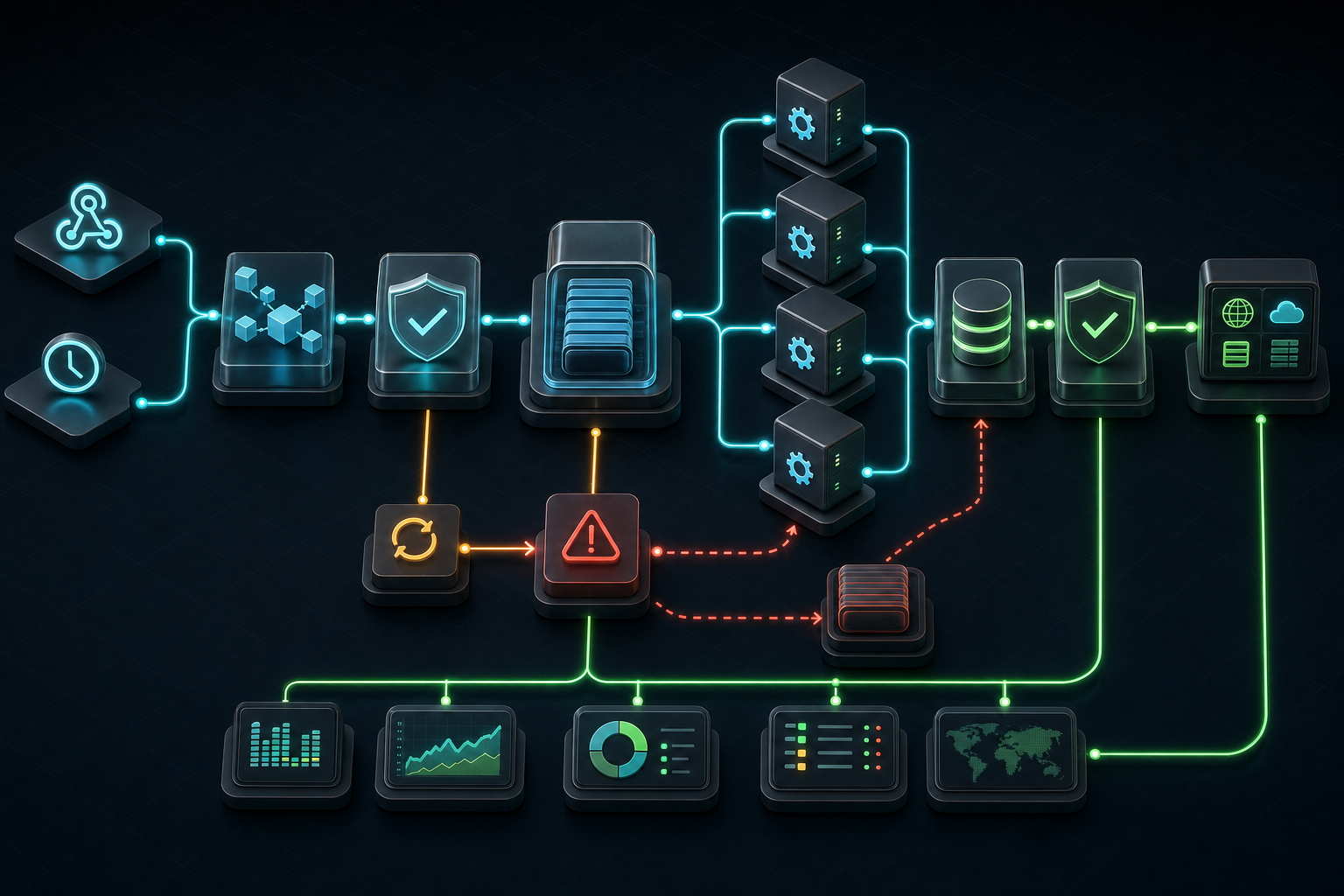
Original FLOW-8 reference architecture with failure routes and production gates
Production n8n architecture, workflow components, failure modes, testing and operations
$ inspect n8n --contract FLOW-8
> frame: event / owner / item-model
> orchestrate: normalize / route / write
> operate: observe / recover / retain
> scale: queue / workers / limitsThe problem: a working canvas is not yet a production workflow
An n8n workflow can pass a manual test and still be difficult to operate. The difference appears when the same automation receives duplicate webhooks, processes several items at once, meets an expired credential, waits for a rate limit, or writes successfully to one system and fails in the next. Production architecture is the set of contracts that makes those conditions visible, bounded and recoverable.
This guide answers one narrow question: how should a maintainable production n8n workflow be structured? It supports the broader AI automation service and AI specialist in Armenia pages without replacing their commercial intent. The focus here is the architecture and review criteria for one workflow.
Before opening the editor, define:
- one business event and one accountable owner;
- what one n8n item represents at every stage;
- the canonical input and output schemas;
- permitted side effects and systems of record;
- duplicate, retry and partial-write behavior;
- sensitive fields and retention rules;
- an observable completion condition;
- a repair path for an operator.
If those points are unknown, more nodes create a larger prototype, not a more reliable system.
Requirements and process boundary
Define the unit of work
The most important data contract is often a sentence: 1 item = 1 order, 1 item = 1 attachment, or 1 item = 1 support request. That meaning can change, but the change must be intentional.
For example, one email may fan out into five attachments. If downstream nodes still assume one item equals one email, subject, sender and message identifiers can disappear or be paired with the wrong file. Normalize the source early and copy required parent context onto every child item immediately after fan-out. When a Code node changes item cardinality, preserve item linking explicitly.
Separate transport success from business success
An HTTP node returning 200 proves that an endpoint replied. It does not prove that a CRM record reached the required state, a payment was accepted, or a notification was delivered exactly once. Define the authoritative receipt or read-back check for every consequential write.
Assign one retry owner
Retries may exist in the source, reverse proxy, n8n node, sub-workflow and target SDK. If every layer retries independently, one temporary outage can multiply requests. Each boundary needs an attempt budget, backoff rule and final failure route. Validation and authorization failures are not transient and should not be retried as network errors.
Make secrets and environments explicit
Credentials belong in n8n credential storage or an approved external secret system, not in Set nodes, Code nodes, exported workflow JSON or execution logs. Development and production should not share writable targets. If source control and environments are available, use a one-direction promotion flow and publish the reviewed workflow version separately from transferring its definition.
FLOW-8: an original maintainable n8n architecture
FLOW-8 is a reference architecture created for this article. It separates workflow responsibilities so each boundary can be inspected and tested.
| Stage | Responsibility | Required evidence | Failure route |
|---|---|---|---|
| F — Frame | Accept and identify the event | source ID, received time, workflow version | reject or quarantine |
| L — Level | Normalize one canonical item model | schema version, mappings, warnings | repair input |
| O — Orchestrate | Route small business steps and sub-workflows | route, owner, timeout | retry or review |
| W — Write safely | Apply an idempotent side effect | idempotency key, request, receipt | compensate or incident |
| O — Observe | Record outcome without leaking secrets | execution ID, correlation ID, status | alert |
| R — Recover | Classify and repair failed executions | error class, attempts, operator action | dead-letter |
| K — Keep | Retain only required execution evidence | retention class, deletion policy | privacy review |
| S — Scale | Add concurrency only from measured demand | queue depth, latency, resource use | throttle |
The point is not to force eight separate workflows. The point is to keep eight contracts distinct. A small automation can implement them in one canvas. A busy platform may use an intake workflow, reusable sub-workflows, queue-mode workers, Postgres, Redis and separate webhook processors.
Canonical workflow envelope
A compact envelope prevents provider-specific fields from leaking through the whole canvas:
type WorkflowEnvelope = {
  eventId: string;
  correlationId: string;
  workflowVersion: string;
  entityType: "support_request";
  entityId: string;
  occurredAt: string;
  attempt: number;
  input: Record<string, unknown>;
  permittedActions: readonly string[];
};
Every side-effecting branch should be able to derive a stable key from this envelope. Every error workflow should be able to report the correlation ID without copying the entire sensitive payload into an alert.
Key components and contracts
Intake workflow
Keep intake short. Authenticate the caller, validate the outer payload, establish event identity, normalize the minimum routing fields and acknowledge according to the source contract. Long-running enrichment, AI calls and multiple external writes should not depend on the webhook connection remaining open.
Do not assume all sources deliver exactly once. Webhooks retry, schedules overlap and operators replay executions. Store or check a deduplication key before irreversible work.
Normalization checkpoint
Convert provider shapes into stable internal names such as messageId, customerId, bodyText, sourceUrl and receivedAt. Prefer Edit Fields/Set for straightforward mapping. Use Code when the shape really needs parsing, grouping, fallback logic or controlled cardinality changes.
The checkpoint should expose:
- the current item meaning;
- required identifiers;
- schema version;
- parsing warnings;
- source references needed later;
- no raw credentials.
Orchestration and sub-workflows
Break a canvas at stable business boundaries, not merely to reduce node count. A useful sub-workflow has a clear input, output, error contract and ownership. Examples include normalize attachment, enrich customer, evaluate request and write CRM update.
Avoid a giant workflow in which every branch can access every credential. Also avoid dozens of tiny sub-workflows that turn one incident into a distributed search. Split when a component is reused, has a different permission boundary, needs independent testing, or has a different scaling profile.
Side-effect gateway
All consequential writes should pass through a small contract:
const command = {
  eventId: $json.eventId,
  correlationId: $json.correlationId,
  action: "crm.ticket.upsert",
  targetId: $json.ticketId,
  idempotencyKey: `${$json.eventId}:crm.ticket.upsert:${$json.ticketId}`,
  expectedVersion: $json.ticketVersion,
  payload: $json.ticketPatch,
};
Validate required fields before the HTTP or app node. Use a target-native idempotency key when available. Otherwise keep a ledger in a durable store and reconcile the target after ambiguous responses. Never treat “Continue On Fail” as a complete recovery design: it changes control flow, but it does not define whether the business action happened.
Error workflow and repair queue
An error workflow should receive a compact incident envelope: workflow, execution, correlation ID, failed node, error class, attempt count and safe diagnostic summary. It should classify:
- retryable transport or rate-limit failure;
- invalid input requiring repair;
- expired or unauthorized credentials;
- target business rejection;
- ambiguous or partial write;
- internal workflow defect.
Alerts should say what the operator can do: retry, repair input, rotate access, reconcile state, compensate, pause, or escalate. A notification with only “workflow failed” moves debugging cost to the next person.
Execution data and retention
Execution history is useful for debugging, but unlimited retention increases database size and privacy risk. Decide which successful, failed and manual executions are stored and for how long. Pruning policy is part of the architecture.
Binary files need special attention. In scaled queue mode, filesystem binary storage is not supported; persistent binary workflows need a compatible external storage design. Storage lifecycle and deletion policy must match execution retention rather than preserving files indefinitely by accident.
Runtime and scaling
Start with measured load. A single well-operated instance can be appropriate for bounded volume. Queue mode becomes useful when executions need worker scaling or isolation: the main instance accepts timers and webhooks, Redis brokers execution IDs, workers read workflow data from the database and write results back.
Queue mode adds dependencies. Main, workers and webhook processors need the same encryption key and access to Redis and the database. n8n recommends Postgres for this topology and does not support a distributed queue setup over SQLite. Webhook processors can scale intake separately, while the editor/main process should remain outside the public webhook load-balancer pool.
Scaling cannot repair a workflow that duplicates writes, loads huge binaries into memory or fans out without bounds. Fix item semantics, payload size, batching and idempotency before adding workers.
Failure modes and practical controls
Duplicate webhook or overlapping schedule
The same business event starts twice.
Control: source event ID, deduplication checkpoint, stable action idempotency key and target reconciliation.
Item-linking drift
A Code or fan-out node changes item count and later expressions resolve the wrong parent.
Control: define the item model, preserve parent identifiers on each output and test multi-item fixtures rather than only one item.
Partial write
The CRM update succeeds but the notification fails. A blind full retry updates the CRM twice.
Control: step-level receipts, per-action idempotency, resume from the failed boundary, or an explicit compensation route.
Rate-limit storm
Many items retry together after 429 and create another burst.
Control: bounded exponential backoff with jitter, small batches, concurrency limits and one retry owner.
Stale credential or permission drift
A workflow remains active after access is revoked or scope changes.
Control: least-privilege credentials, credential ownership, readiness checks, actionable authentication alerts and a reviewed rotation procedure.
Error swallowed by a permissive node setting
The canvas continues and a downstream sink receives incomplete data.
Control: distinguish optional enrichment from required state. Required failures go to a named error route; optional failures carry an explicit degraded flag.
Unbounded execution history or binary data
The database or storage grows until the instance slows or fails.
Control: execution pruning, binary lifecycle rules, payload-size limits and capacity alerts.
Manual production editing
A quick canvas fix changes production without review and cannot be reproduced.
Control: protected production where available, exported/version-controlled definitions, one-way promotion, release notes and rollback to a known workflow version.
Testing strategy
Contract fixtures
Keep safe representative payloads for normal, missing-field, duplicate, multi-item and malformed cases. Test the normalized output and every side-effect command before enabling writes.
Node-level checkpoints
Inspect output after intake, normalization, fan-out, regrouping, AI parsing and sink formatting. A production test should include several items so item linking and cardinality bugs become visible.
Integration tests
Use sandbox targets or reversible records. Exercise credential expiry, 429, timeout, target validation failure and ambiguous acknowledgement. Verify that retry does not duplicate a completed write.
Recovery tests
Start from a stored failed execution or controlled fixture. Confirm the operator can identify the business entity, understand the failure, repair or retry the correct boundary, and prove the final state.
Load and soak tests
Measure queue depth, execution latency, failure rate, database growth, worker saturation and downstream rate limits with realistic payload sizes. Choose concurrency from observed constraints, not from the number of CPU cores alone.
Production checklist
Before activation, verify:
- one item has an explicit meaning at every cardinality change;
- source data is normalized before branching;
- event and action identifiers support deduplication;
- each required branch has a defined failure route;
- each side effect is idempotent or has a reconciliation ledger;
- retries are bounded and owned by one layer;
- partial writes have resume, compensation or incident handling;
- credentials are least privilege and absent from workflow JSON and logs;
- production targets are isolated from development;
- error alerts contain correlation and operator action;
- successful and failed execution retention is intentional;
- binary data has storage and lifecycle rules;
- multi-item, duplicate, rate-limit and credential-failure fixtures pass;
- monitoring checks readiness, not only process reachability;
- rollback restores a known workflow version;
- an owner can pause, replay, repair and reconcile the workflow.
From prototype to maintainable production
Use four gates.
- Fixture replay: run saved payloads with sinks mocked or disabled.
- Sandbox: use real integrations against non-production targets and inject failures.
- Shadow or draft: process live events without consequential writes, or require an operator to apply them.
- Bounded production: enable only the proven route, with concurrency limits, alerts, retention and rollback.
The review should end with a concrete decision: activate, narrow, repair, or keep the workflow assistive. The case studies show the type of engineering evidence that can support such a decision. An architecture review is useful when the event, owner, target action and failure consequence are already known.
require(eventId && correlationId && itemModel && workflowVersion);
require(idempotencyKey && boundedRetry && errorRoute && retentionPolicy);
production = multiItemTestsPass && recoveryTested && ownerReady;