Vibe Coding for Founders: A Safe Hypothesis Validation Workflow
State the hypothesis
Observe the task
Decide the next step
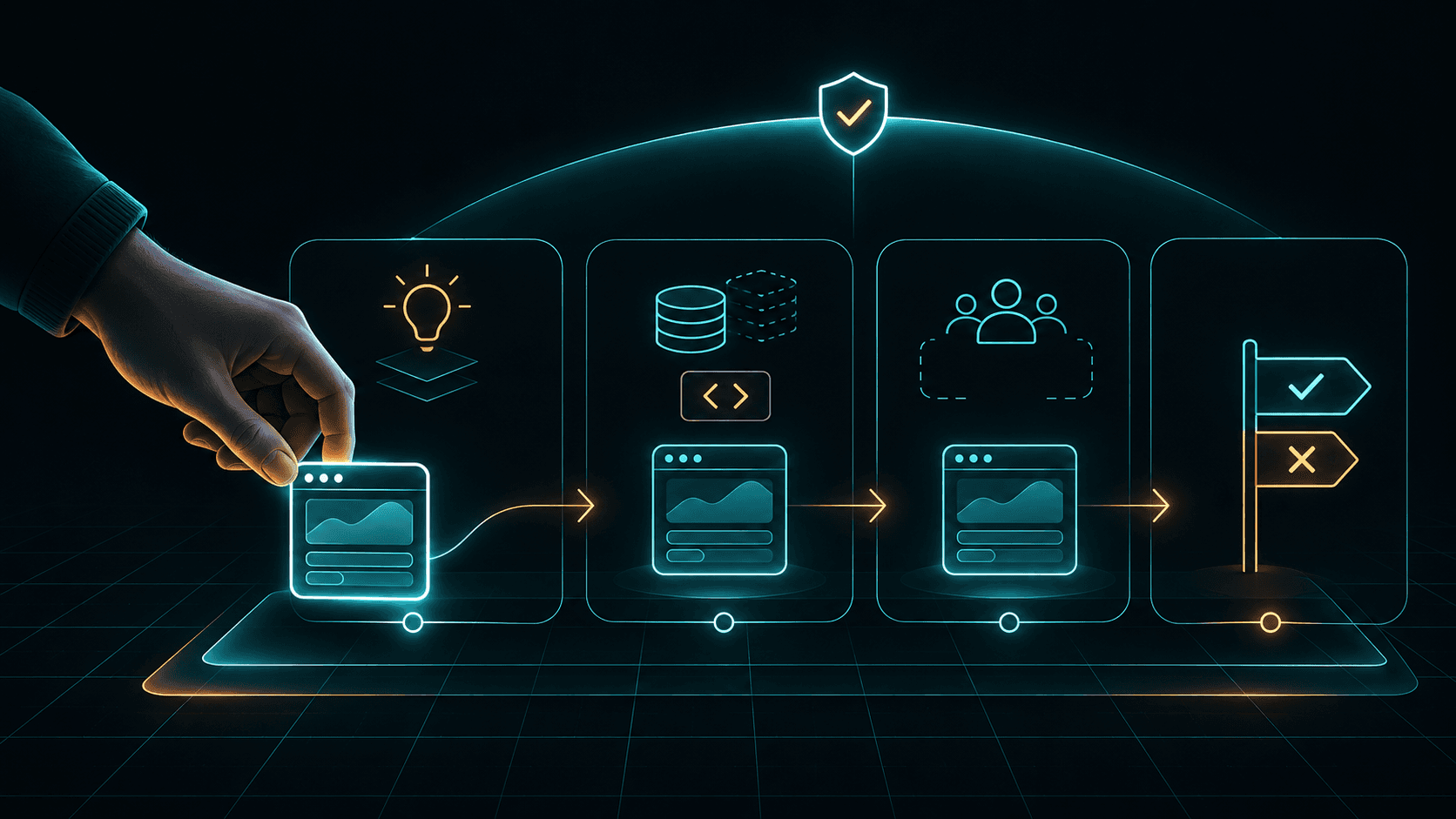
Original five-stage validation workflow
$ validate --contract FOUNDER-GATE-5
> define: hypothesis / disconfirming signal
> bound: synthetic data / no external writes
> observe: task / friction / decisionA founder needs an answer to a narrow question: will a specific user perform a specific action to solve a real problem? Vibe coding can produce a screen quickly, but the experiment is only as useful as its question, observations, and data boundary. This guide describes one controlled validation loop. The broader approach is covered on the vibe coding service page.
Prerequisites and data
Write the hypothesis before writing code: “A user in role X, facing problem Y, can complete action Z without help.” State what would contradict it. For example, the participant cannot complete the task unaided or cannot explain the value of the result. No fixed participant count or success percentage is universally valid; choose a decision threshold for your own risk and stage.
Consider a fictional team testing whether a preliminary project brief can reduce back-and-forth messages. The input is an anonymized problem statement, a category and the desired outcome. The output is a structured draft brief with a copy button. Version one has no account creation, outbound messages, payments, CRM writes or real customer records. It tests whether the form makes sense without pretending to be an operating system.
Classify the data before the experiment: synthetic, approved business data, personal data, and secrets. Use synthetic material for the prototype. If the hypothesis requires the other categories, define access, retention, deletion and ownership separately. Keep API keys out of browser code and public repositories. If participants can enter free text, tell them what is permitted and validate it at the server boundary.
Workflow design
The original FOUNDER-GATE-5 workflow makes five decisions explicit. It is a reusable method, not a measured project result:
1. HYPOTHESIS → user, task, expected action, disconfirming signal
2. BOUNDARY   → test data, no irreversible actions
3. PROTOTYPE  → one short path from input to understandable output
4. OBSERVE    → task completion, pauses, errors, questions
5. DECIDE     → revise, repeat a bounded test, or design a pilot
At the prototype step, ask the AI tool for one vertical slice: form → input validation → result draft → understandable error. Give it acceptance criteria, limits, and example inputs and outputs. Review changed files and run the app locally. If generated code adds an integration you did not request, remove it before the test.
Example input: “We need to organize customer inquiries; requests now get lost between email and chat.” Expected output: a draft with fields for the problem, current process, desired outcome and missing information. Invalid output: a confident project price or automatic delivery of the brief to a third party. This example is testable without impersonating real customers.
Integrations and contracts
The first hypothesis test often needs no external integration. If one is essential, define the contract first: caller, transmitted data, key storage, access limits, timeout behavior and spend owner. Use an isolated test environment and the least permissions needed. A “success” message must reflect the intended completed action, not merely a successful UI response.
Keep two levels separate. A prototype demonstrates a task and collects observations. A pilot works with approved data and has an owner, error log and recovery procedure. Moving between them is a decision gate. See the project decision tree and the production failure analysis.
Prelaunch checks
Write acceptance criteria before inviting participants:
- The participant understands the screen's purpose and completes one task without author guidance.
- Empty or invalid input gets an explanation; the form does not present invented facts as confirmed results.
- The prototype sends nothing to CRM, email or analytics without an agreed explicit action.
- No secrets appear in client code, and test data contains no real names or contacts.
- An owner can stop the test, delete its data and restore the previous version.
- An observer records friction and participant words with permission, separating observations from interpretation.
Exercise the path on narrow and wide screens, by keyboard, with empty input and with a network failure. Inspect browser network requests. After each change, rerun the core path and error cases. If you cannot safely verify an external write, leave it disconnected from the experiment.
Operation and decision
After each session, record the original task, participant action, stopping point, participant statement, your interpretation and the next change to test. A single positive impression does not prove demand. Compare observations with the disconfirming signal you wrote before building.
Choose among three outcomes: reframe the problem, run another bounded test, or design an engineered pilot. A pilot adds data ownership, permissions, integration contracts, failure tests and rollback. If the hypothesis fails, stopping development is also useful; avoid automating an unvalidated process.
To discuss a controlled pilot, bring the hypothesis, data boundary and anonymized observations. The case studies show how real work is documented, and the project brief helps frame the next step. The broader AI engineering offer in Armenia lives on a separate landing page.
if (realData || externalWrite) return DESIGN_CONTROLLED_PILOT;
if (taskBlocked) return REVISE_HYPOTHESIS;
return REPEAT_BOUNDED_TEST_OR_PILOT;